
Best Practices for Enhanced Kubernetes Security
Kubernetes security is critical for ensuring the reliability, confidentiality, and integrity of cloud-native applications. As Kubernetes environments have matured, the security focus has expanded beyond cluster configuration to include workload identity, software supply-chain security, admission policies, runtime protection, and Zero Trust principles.
At Retesys, we specialize in setting up Kubernetes environments in public and private clouds, configuring CI/CD pipelines for application deployment, and developing secure cloud-native applications.
In this article, we'll walk you through Kubernetes security best practices that are relevant for production environments in 2026.
1. RBAC and Least-Privilege Access
Implement granular Role-Based Access Control (RBAC) in Kubernetes and follow the principle of least privilege.
Avoid granting broad permissions through wildcard resources, verbs, or unnecessarily powerful ClusterRoleBindings. Prefer namespace-scoped Roles and RoleBindings whenever cluster-wide permissions are not required.
Service accounts should also receive only the permissions their workloads actually need. Avoid reusing one highly privileged service account across unrelated applications.
Regularly audit RBAC policies and remove obsolete users, bindings, service accounts, and permissions. Commands such as kubectl auth can-i can help verify effective permissions, while automated security tools can identify excessive privileges.
Pay particular attention to permissions that allow users or service accounts to create Pods, access Secrets, modify RBAC objects, execute commands inside containers, or impersonate other identities, because these capabilities can result in privilege escalation.
2. Pod Security Admission, Pod Security Standards, and Admission Policies
PodSecurityPolicy (PSP) is no longer available in modern Kubernetes. PSP was deprecated in Kubernetes 1.21 and removed in Kubernetes 1.25. Kubernetes now provides the built-in Pod Security Admission controller for enforcing the Pod Security Standards.
Pod Security Standards define three security levels:
Privilegedprovides unrestricted access and should be limited to workloads that genuinely require elevated permissions.Baselineprevents common privilege-escalation techniques while supporting most typical workloads.Restrictedfollows stronger hardening practices and should be the target for regular application workloads whenever possible.
Pod Security Admission applies these standards at the namespace level and supports enforce, audit, and warn modes. A practical migration strategy is to start with audit and warn, remediate incompatible workloads, and then enable enforcement. Kubernetes specifically recommends evaluating every namespace rather than leaving namespaces without a defined Pod Security posture.
Pod Security Standards intentionally cover common pod-level security controls rather than every organization-specific policy. For requirements such as mandatory labels, approved registries, image digest enforcement, custom resource restrictions, or organization-specific rules, use additional admission policies.
Modern Kubernetes provides ValidatingAdmissionPolicy, which has been stable since Kubernetes 1.30 and evaluates Common Expression Language (CEL) policies directly in the API server. This can reduce the need for custom admission webhooks for relatively straightforward validation rules.
For more advanced policy-as-code requirements, projects such as Kyverno and OPA Gatekeeper remain widely used.
3. Minimal Container Images and Ephemeral Containers
Use minimal container images that contain only the application and the runtime dependencies required to execute it.
Distroless images, scratch-based images, and other carefully maintained minimal base images reduce the number of packages, binaries, shells, and utilities available to an attacker if a container is compromised. They can also reduce the number of vulnerabilities reported by image scanners.
However, smaller production images usually contain few or no troubleshooting tools. Do not solve this problem by adding shells, network utilities, package managers, or debugging packages to every production image.
Instead, use Kubernetes Ephemeral Containers and kubectl debug when live troubleshooting is required. Ephemeral containers have been stable since Kubernetes 1.25 and allow debugging tools to be introduced temporarily without permanently increasing the attack surface of the application image.
Keep debugging access protected by RBAC because the ability to attach debugging containers to production workloads is itself security-sensitive.
4. Security Contexts and Runtime Isolation
Define pod and container securityContext settings explicitly instead of relying only on runtime defaults.
For Linux workloads, common hardening settings include:
runAsNonRoot: true;- an appropriate non-root UID and GID;
allowPrivilegeEscalation: false;- dropping unnecessary Linux capabilities, preferably starting from
drop: ["ALL"]; - avoiding privileged containers;
- avoiding unnecessary host namespaces and host mounts;
readOnlyRootFilesystem: truewhere the application supports it;- a seccomp profile such as
RuntimeDefault.
Kubernetes security contexts also support mechanisms including SELinux, AppArmor, seccomp, Linux capabilities, and read-only root filesystems.
The Restricted Pod Security Standard requires important controls such as preventing privilege escalation, restricting capabilities, and using an appropriate seccomp configuration for applicable Linux workloads.
For workloads that process untrusted code or require additional isolation, consider sandboxed runtimes such as gVisor or Kata Containers through RuntimeClass. Sandboxing should complement rather than replace RBAC, admission control, network policies, and workload hardening.
5. etcd and Encryption at Rest
etcd contains the Kubernetes cluster state, including sensitive configuration and Secret objects. Access to etcd should therefore be treated as highly privileged.
Protect etcd using mutual TLS for client and peer communication and restrict network connectivity so that only the Kubernetes components that legitimately require access can reach it.
Kubernetes Secrets are not automatically encrypted simply because they are stored as Secret objects. Without additional encryption configuration, Kubernetes can store their values unencrypted in etcd.
Configure Kubernetes EncryptionConfiguration to encrypt sensitive API resources at rest. For stronger key protection, integrate encryption with an external Key Management Service rather than keeping all encryption key material directly on control-plane hosts.
For Kubernetes installations using a KMS provider, use KMS v2 when feasible. The current Kubernetes documentation recommends KMS v2; KMS v1 has been deprecated since Kubernetes 1.28 and disabled by default since 1.29, while KMS v2 has been stable since 1.29.
Establish procedures for rotating encryption keys and certificates, and verify that previously stored resources are re-encrypted when keys change.
6. Node and Kubelet Hardening
Worker nodes are part of the Kubernetes security boundary. A compromised node can expose containers, credentials, network traffic, and other workloads scheduled on that host.
Use minimal, purpose-built operating systems where practical and disable unnecessary services and packages. Depending on the platform, examples include cloud-provider container-optimized operating systems and Kubernetes-focused systems such as Bottlerocket.
Keep the operating system, Linux kernel, container runtime, kubelet, and supporting packages patched. Regularly update containerd, CRI-O, CNI plugins, CSI drivers, and other node-level components as part of the cluster upgrade process.
Restrict administrative access to nodes. Production nodes generally should not be treated as normal application servers where operators routinely log in and install packages.
Protect kubelet endpoints with appropriate authentication, authorization, and TLS settings. Restrict network access to node management ports using cloud security groups, firewalls, or equivalent controls.
Use the CIS Kubernetes Benchmark and automated tools such as kube-bench to identify configuration weaknesses.
7. API Authentication and Workload Identity
Use centralized identity management for access to the Kubernetes API.
For human administrators and developers, prefer an external identity provider integrated through OpenID Connect (OIDC) or the authentication mechanism supported by your managed Kubernetes platform. Enforce multi-factor authentication, short session lifetimes, and centralized account lifecycle management at the identity provider.
Kubernetes supports OIDC authentication, while authorization remains controlled separately through mechanisms such as RBAC.
Avoid distributing long-lived Kubernetes credentials to users.
Workloads require a different approach. Give each application an appropriate Kubernetes ServiceAccount, assign it minimal RBAC permissions, and avoid using the namespace's default service account for everything.
Modern Kubernetes uses short-lived projected ServiceAccount tokens. The TokenRequest API and projected token volumes create time-limited credentials that can be rotated automatically. Long-lived ServiceAccount token Secrets are still possible but are explicitly not recommended for normal use.
If a Pod does not need Kubernetes API credentials, set:
automountServiceAccountToken: false
Where supported by the cloud platform, use workload identity or workload federation mechanisms to let applications obtain cloud permissions without storing long-lived cloud access keys inside Kubernetes Secrets.
8. Kubernetes Backup and Recovery
Security includes the ability to recover from compromise, operator error, ransomware, or loss of control-plane infrastructure.
For self-managed control planes, regularly create etcd snapshots and protect them as highly sensitive data. An etcd backup contains the cluster's state and can expose credentials and other confidential information, so backups should be encrypted and access-controlled.
Also back up infrastructure configuration, Kubernetes resources, persistent application data, encryption configuration where applicable, and the information required to rebuild the cluster.
Tools such as Velero can automate backup and recovery of Kubernetes resources and persistent volumes.
Do not consider a backup strategy complete until recovery has been tested. Periodically restore backups into an isolated environment and verify that applications, persistent data, Secrets, and cluster configuration can be recovered within the expected recovery objectives.
Keep backup credentials separate from ordinary cluster credentials so that compromise of the cluster does not automatically give an attacker the ability to destroy the backups.
9. Continuous Security Auditing
Security assessment should be continuous rather than a one-time activity performed when the cluster is created.
Use tools such as kube-bench to evaluate Kubernetes configurations against the CIS Kubernetes Benchmark.
Complement benchmark checks with tools that identify vulnerable or dangerous cluster configurations, container vulnerabilities, and risky manifests. Depending on your environment, examples include Trivy, Kubescape, KubeLinter, Polaris, Checkov, and commercial Kubernetes Security Posture Management platforms.
Security auditing should also include manual reviews of:
- privileged workloads;
- excessive RBAC permissions;
- unused service accounts;
- publicly exposed services;
- Secrets access;
- stale namespaces and workloads;
- admission policy exceptions;
- Kubernetes audit events.
Run configuration and policy scans not only against the live cluster but also against manifests and Helm charts before deployment.
10. Network Segmentation and Egress Control
Kubernetes networking is permissive unless additional policies are applied.
Use NetworkPolicy to restrict communication between workloads. NetworkPolicy controls traffic at the IP address and port level, but it only works when the cluster's networking plugin actually implements NetworkPolicy enforcement.
A strong starting model is:
- deny ingress by default;
- deny egress by default where practical;
- explicitly allow only the communication required by the application.
Apply policies consistently to application namespaces and pay particular attention to egress. Limiting outbound connectivity makes it more difficult for a compromised workload to reach cloud metadata endpoints, internal administration systems, external command-and-control infrastructure, or arbitrary Internet destinations.
NetworkPolicy has limitations. Standard policies primarily operate at Layers 3 and 4. CNI implementations such as Calico and Cilium can provide additional policy capabilities.
For multi-tenant environments, combine network controls with RBAC, Pod Security Admission, quotas, service-account isolation, and potentially separate clusters. Kubernetes explicitly warns that NetworkPolicy resources are ineffective if the CNI does not support their enforcement.
11. Compliance Automation
Automate compliance checking rather than relying on occasional manual reviews.
For Kubernetes configuration, use Kubernetes-oriented tools such as kube-bench, Kubescape, KubeLinter, Polaris, policy engines, or Kubernetes Security Posture Management platforms.
kube-bench is specifically designed to evaluate Kubernetes installations against the CIS Kubernetes Benchmark.
Tools such as OpenSCAP remain useful for operating-system compliance, but they should not be presented as the primary tools for evaluating Kubernetes API objects or Kubernetes-specific security configuration. Likewise, oscap-podman is focused on Podman/container environments rather than Kubernetes cluster posture.
Integrate relevant checks into CI/CD so that insecure Kubernetes manifests can be rejected before they reach production, while continuing to scan deployed clusters for configuration drift.
For managed Kubernetes platforms, also review the security and CIS guidance published specifically for your provider and Kubernetes distribution.
12. Service Mesh and Workload-to-Workload Security
A service mesh can provide workload identity, mutual TLS, authorization policy, and observability for service-to-service communication.
Projects such as Istio and Linkerd can automatically establish encrypted communication between participating workloads.
For example, when using Istio, configure authentication policies appropriately and move security-sensitive environments to strict mTLS rather than leaving destinations able to accept plaintext traffic.
However, a service mesh should not be treated as a mandatory Kubernetes security component. It adds operational complexity and should be introduced when its identity, encryption, authorization, or traffic-management capabilities solve a real requirement.
NetworkPolicy, RBAC, Pod Security Admission, and proper application authentication remain necessary even when a service mesh is deployed.
13. Image, Configuration, and Artifact Security
Container security should begin before an image reaches the cluster.
13.1 Image Scanning
Scan container images for known vulnerabilities during CI/CD using tools such as Trivy, Grype, Anchore, Clair, or equivalent security platforms.
Define vulnerability-management policies rather than treating every scanner result equally. Consider severity, exploitability, whether the vulnerable component is actually present in the runtime path, and whether an upstream fix exists.
Re-scan images stored in registries because new vulnerabilities may be discovered after an image has already been built.
Use maintained base images and rebuild application images regularly so that security fixes in operating-system packages and runtime dependencies are incorporated.
13.2 Kubernetes Configuration Scanning
Scan Kubernetes manifests, Kustomize output, and Helm-rendered manifests before deployment.
Tools such as KubeLinter, Checkov, Polaris, Kubescape, Conftest, Kyverno CLI, and similar policy tools can identify insecure settings including privileged containers, dangerous capabilities, missing security contexts, risky RBAC rules, use of untrusted registries, and other policy violations.
Enforce critical controls at admission time as well. CI scanning gives developers early feedback, while admission controls prevent unsafe resources from being deployed through a different path.
13.3 Image Signing and Verification
Scanning establishes what is inside an image; signing establishes whether the artifact is one you trust.
Use technologies such as Sigstore/Cosign to sign container images and, where appropriate, associated attestations.
Configure admission policies or a signature-verification controller to reject images that do not satisfy your organization's trust policy.
Where the runtime supports signature verification, it can provide an additional enforcement layer. However, signature validation should not be described as an automatic Kubernetes feature for every container runtime; enforcement depends on the chosen runtime and policy implementation.
Prefer immutable references such as image digests for production deployments rather than mutable tags alone. An image such as application:latest can change while the Kubernetes manifest stays identical; a digest identifies a specific artifact.
Note: Image scanning, configuration scanning, signing, provenance generation, and Software Bill of Materials creation normally belong in the software delivery pipeline. For more on CI/CD tools, see our article Top 2 CI/CD Tools and Kubernetes Deployments.
14. Secrets Management
Use Kubernetes Secrets for confidential Kubernetes data rather than ConfigMaps, but understand their security model.
Secret values are base64-encoded, not encrypted merely because they are stored in a Secret. Kubernetes documentation notes that Secrets can be stored unencrypted by default unless encryption at rest is explicitly configured.
Restrict access through RBAC. In particular, be careful with get, list, and workload-creation permissions. A user who can create a Pod that consumes a Secret may effectively be able to obtain that Secret even if direct get secret permission is unavailable.
Prefer short-lived and automatically rotated credentials whenever the application and external system support them.
For larger environments, integrate Kubernetes with an external secret-management platform such as a cloud secret manager or HashiCorp Vault. The Kubernetes Secrets Store CSI Driver can mount data obtained from supported external providers into authorized Pods. Kubernetes documentation explicitly describes external Secret stores as an option for keeping confidential data outside the cluster.
Do not commit plaintext Secret manifests to Git. Base64 encoding provides no confidentiality.
Applications must also protect Secrets after reading them: avoid logging credentials, exposing them through diagnostics, or unnecessarily injecting the same Secret into every container in a Pod.
15. Runtime Detection, Audit Logging, and Forensics
Preventive controls cannot stop every incident, so production clusters also need runtime detection and forensic visibility.
Use runtime security tools such as Falco to identify suspicious behavior including unexpected process execution, privilege escalation attempts, unusual file access, container escape indicators, and other runtime events.
Combine runtime alerts with Kubernetes audit logs, container logs, node logs, cloud audit events, identity-provider logs, and network telemetry.
Forward relevant events to a centralized logging or SIEM platform where they cannot easily be deleted by an attacker who has compromised the cluster.
Enable Kubernetes API audit logging with a policy appropriate for your environment and securely archive audit data. Kubernetes security guidance recommends enabling and protecting audit logs.
Prometheus is highly useful for metrics and operational observability, but it should not be described as a runtime threat-detection system. Security detection should rely on appropriate runtime, audit, SIEM, identity, and network telemetry. Metrics can then provide additional context during detection and incident investigation.
Maintain incident-response procedures covering credential revocation, workload isolation, evidence collection, malicious-image identification, node replacement, and restoration from known-good state.
16. Namespace Isolation and Multi-Tenancy
Use namespaces to organize workloads and to scope RBAC, quotas, Pod Security configuration, and NetworkPolicies.
Separate applications, teams, and environments where doing so creates useful administrative and security boundaries. Avoid running unrelated production and development workloads with the same permissions and policies.
Assign dedicated service accounts and RBAC permissions to each application or workload group. Apply ResourceQuotas, LimitRanges, default network policies, and Pod Security Admission configuration consistently when namespaces are provisioned.
However, namespaces are not a complete hard security boundary. Workloads in different namespaces can still share worker nodes, the same kernel, networking infrastructure, and control plane.
For mutually untrusted tenants or particularly sensitive systems, consider stronger isolation such as dedicated node pools, sandboxed runtimes, virtual clusters, or separate Kubernetes clusters. Kubernetes multi-tenancy guidance similarly describes namespace isolation as something that needs to be reinforced by RBAC, NetworkPolicy, admission controls, and other mechanisms.
17. Control Plane Security
Protect the Kubernetes control plane because compromise of the API server, etcd, certificate authority, or other privileged components can lead to compromise of the entire cluster.
Where possible, keep control-plane endpoints on private networks and restrict Kubernetes API access to trusted administrative networks, VPNs, zero-trust access proxies, or other controlled entry points.
Protect the API server with:
- strong authentication;
- least-privilege authorization;
- admission controls;
- TLS;
- audit logging;
- restricted network exposure.
Protect etcd independently as described earlier.
Secure certificate-authority private keys and other control-plane credentials. Rotate certificates and credentials according to your platform's lifecycle procedures.
Disable or restrict unnecessary Kubernetes features, APIs, add-ons, and administrative interfaces. Kubernetes security guidance recommends evaluating alpha and beta functionality carefully and disabling features that are not required.
For managed Kubernetes services, enable the provider's available security capabilities, such as private control-plane access, managed encryption, workload identity, audit logging, security posture management, and restricted authorized networks where appropriate.
18. Resource Requests, Limits, and Quotas
Resource controls improve both reliability and security by limiting the impact of buggy or malicious workloads.
Define realistic CPU and memory requests so that the scheduler can place workloads correctly.
Use memory limits where appropriate to prevent a workload from consuming unlimited node memory. CPU limits may also be useful depending on application requirements, although they should be configured with an understanding of potential throttling.
At the namespace level, use ResourceQuota to control aggregate consumption and LimitRange to enforce defaults or minimum/maximum values.
Also consider quotas for object counts where relevant—for example, the number of Pods, Services, Secrets, or persistent volume claims—so an account with limited namespace access cannot create unlimited Kubernetes resources.
Resource limits alone are not complete denial-of-service protection. Combine them with application-level rate limiting, network protections, autoscaling policies, API server protections, and appropriate cloud infrastructure limits.
19. Zero Trust Architecture
Apply Zero Trust principles throughout the Kubernetes environment: do not assume that a request is trustworthy simply because it originates inside the cluster network.
Authenticate human users, workloads, and automated systems with distinct identities.
Authorize each identity for only the operations it requires.
Apply admission controls before resources are accepted by the cluster.
Use default-deny network segmentation where practical and explicitly permit required communication.
Use authenticated and encrypted service-to-service communication when workloads exchange sensitive information.
Protect cloud access through workload identity rather than static credentials.
Continuously monitor activity because a correctly authenticated workload can still become malicious after compromise.
Zero Trust in Kubernetes is therefore not a single product or feature. It is the combined result of identity, RBAC, admission control, workload security, network segmentation, encryption, supply-chain security, and continuous monitoring.
20. SBOMs, Provenance, and SLSA
Modern Kubernetes security also requires protecting the software supply chain before artifacts reach the cluster.
Generate a Software Bill of Materials (SBOM) for application artifacts so that teams can identify which libraries and packages are deployed when a new vulnerability is disclosed.
Use standard formats such as SPDX or CycloneDX and associate SBOM information with the corresponding immutable application artifact.
An SBOM answers what an artifact contains, but it does not prove that the artifact was built securely. Combine SBOM generation with cryptographic signatures and build provenance.
Adopt the SLSA (Supply-chain Levels for Software Artifacts) framework to improve protection against unauthorized modifications to source code, build pipelines, dependencies, and generated artifacts.
A mature software-supply-chain workflow should establish a verifiable relationship between:
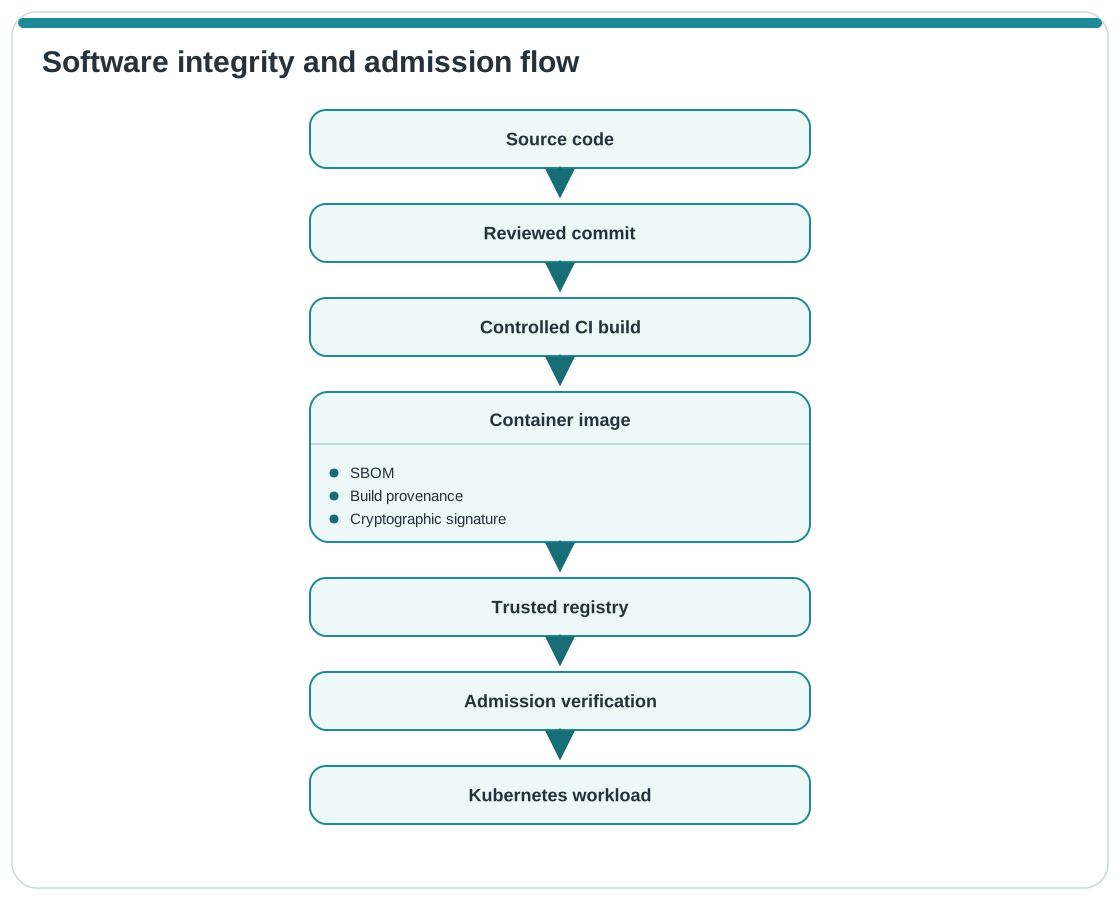
Generate provenance from trusted build systems, protect signing identities, store attestations alongside artifacts where appropriate, and enforce relevant verification policies before deployment.
The objective is not simply to know that an image has no currently known vulnerabilities. You should also be able to establish where it came from, how it was built, what it contains, and whether it has been modified.
21. GitOps Security
GitOps can improve Kubernetes security because infrastructure and application configuration changes become reviewable and auditable, but the Git repository and deployment controller also become security-critical systems.
Protect production Git repositories with strong authentication, MFA, branch protection, required pull-request reviews, and restricted write permissions.
Where supported by your development platform, use signed commits or other mechanisms that improve change provenance for security-sensitive repositories.
Do not store plaintext Secrets in Git. Use an appropriate solution such as an external secret manager, External Secrets, Secrets Store CSI Driver, or an encrypted Git-oriented secret workflow such as Sealed Secrets, depending on your architecture.
Configure Argo CD, Flux, or other GitOps controllers with least-privilege Kubernetes permissions. A GitOps controller with unrestricted cluster-administrator access can turn compromise of the controller or its repository credentials into full cluster compromise.
Separate Git read credentials, container-registry credentials, cloud credentials, and Kubernetes permissions instead of giving one controller identity unrestricted access to every system.
Prefer short-lived or federated credentials where the Git, cloud, and CI/CD platforms support them.
Integrate security checks into pull requests so that manifests are scanned before they can be merged. Admission controls should still enforce important policies at the cluster boundary because not every Kubernetes change necessarily passes through the expected GitOps workflow.
Monitor both Git activity and GitOps controller activity. Unexpected repository modifications, configuration drift, failed signature verification, reconciliation changes, or privilege modifications should generate security-relevant events.
Conclusion
Kubernetes security in 2026 requires more than hardening the cluster once and periodically scanning it for vulnerabilities. Security controls need to operate throughout the complete application lifecycle—from developer access and source code to CI/CD, artifact generation, admission, runtime execution, network communication, monitoring, and disaster recovery.
A strong Kubernetes security baseline combines:
- least-privilege RBAC and workload identities;
- Pod Security Standards and admission policies;
- hardened containers, nodes, and control-plane components;
- encryption and carefully managed Secrets;
- default-deny network segmentation;
- vulnerability scanning, signing, SBOMs, and build provenance;
- centralized audit logging and runtime threat detection;
- secure GitOps and CI/CD workflows;
- tested backup and recovery procedures.
The most effective approach is defense in depth. No individual control—RBAC, NetworkPolicy, a service mesh, image scanning, or an admission controller—can secure a Kubernetes environment by itself. Combining independent security controls significantly reduces both the likelihood of compromise and the blast radius when an incident occurs.
Adhering to these Kubernetes security best practices paves the way for robust DevSecOps pipelines, enabling faster releases and maintaining enterprise-grade security.
At Retesys, we can help you deploy secure Kubernetes environments, configure CI/CD pipelines, and develop cloud-native applications following the best security practices outlined in this guide.
Contact us today to learn how we can enhance the security and efficiency of your Kubernetes deployments.
Contact Us