
Choosing Between WPF and .NET MAUI for Desktop and Cross-Platform App Development in 2026
WPF and .NET MAUI solve different classes of .NET client-development problems.
WPF (Windows Presentation Foundation) remains a Windows-specific desktop framework with mature XAML capabilities, designer tooling, third-party controls, and deep access to Windows APIs.
.NET MAUI (Multi-platform App UI) provides a shared application model for Android, iOS, Windows, and macOS through Mac Catalyst, while still allowing developers to use platform-specific code where required.
In 2026, the decision is therefore not "old WPF versus new MAUI" or "rich UI versus cross-platform support." Both frameworks are actively maintained, and each is better suited to different application requirements.
The choice should consider:
- Target operating systems
- Desktop-specific UX requirements
- Mobile and device integration
- Existing code and team expertise
- Deployment, signing, and CI/CD requirements
- Performance characteristics
- Framework servicing and upgrade cadence
- Existing web or Blazor UI assets
- Native hardware integration
- Long-term application maintenance
For new and actively modernized projects, the relevant baseline today is WPF on .NET 10 and .NET MAUI 10.
WPF (Windows Presentation Foundation)
WPF remains one of the strongest options for building sophisticated Windows desktop applications with .NET.
It is particularly well suited to enterprise applications, industrial and engineering software, trading applications, internal business systems, hardware-integrated software, and applications with dense desktop workflows.
WPF Advantages
Mature Desktop UI and Tooling
WPF has a long-established XAML development ecosystem.
Visual Studio provides XAML editing, debugging, Hot Reload capabilities, and a visual designer, while Blend for Visual Studio provides additional tooling for advanced styling, templates, animations, visual states, and designer/developer workflows.
This remains an important advantage for applications with heavily customized Windows interfaces.
WPF also provides a very flexible UI model built around:
- Styles and resources
- Control templates
- Data templates
- Triggers
- Animations
- Custom controls
- Vector graphics
- Rich data binding
For desktop applications with highly customized interfaces, WPF generally offers more flexibility than MAUI's cross-platform control abstraction.
Strong MVVM Support
WPF's data binding, commands, resources, templates, and dependency-property system make it a natural fit for the MVVM (Model-View-ViewModel) pattern.
MVVM is not required, but it remains a common architecture for keeping UI logic separated from application and domain logic.
Modern WPF applications can also use framework-neutral libraries such as CommunityToolkit.Mvvm, allowing view models and presentation logic to remain testable and, where appropriate, reusable outside WPF.
Mature Performance Characteristics
WPF has a mature hardware-accelerated Windows rendering architecture and can provide excellent performance for complex desktop applications.
However, performance should not be treated as automatic. It still depends on factors such as:
- Visual-tree complexity
- Data virtualization
- Control templates
- Binding frequency
- Large collections
- Effects and animations
- Layout complexity
- Application architecture
.NET 10 introduced additional WPF performance improvements in areas including XAML processing, font handling, dynamic resources, caching, input processing, pixel conversion, and allocation behavior.
For performance-sensitive applications, representative screens and data workloads should still be profiled rather than relying only on framework reputation.
Mature Third-Party Ecosystem
WPF has a mature ecosystem of commercial and open-source libraries for desktop-oriented functionality such as:
- Advanced data grids
- Charts and visualization
- Docking layouts
- Reporting
- Diagramming
- Property editors
- Specialized line-of-business controls
- MVVM infrastructure
This can significantly reduce development effort for complex business applications.
As with any dependency, teams should evaluate whether a library is actively maintained, supports current .NET versions, and has acceptable licensing terms.
Windows and Hardware Integration
When an application depends heavily on Windows-specific functionality, WPF is often the most straightforward choice.
Modern WPF applications can use current .NET libraries and Windows APIs for areas such as:
- USB and HID communication
- Serial devices
- File-system integration
- Windows services
- COM interoperability
- Native DLLs
- Specialized hardware
- Windows security APIs
Hardware integration should no longer be described primarily as a ".NET Framework" capability. WPF applications running on modern .NET can use modern packages and APIs.
For third-party hardware packages, review current .NET compatibility, maintenance status, native driver dependencies, security considerations, and licensing before adoption.
Open Source and Actively Maintained
Modern WPF is open source in Microsoft's dotnet/wpf repository under the MIT license.
WPF continues to receive fixes and framework improvements as part of current .NET development. .NET 10, for example, added performance improvements and continued work on modern Fluent styling.
WPF should therefore not be treated as a frozen or abandoned legacy framework.
WPF Limitations
Windows Only
WPF applications run only on Windows.
That makes WPF unsuitable when the same client application must also run natively on Android, iOS, or macOS.
However, Windows-only support is not necessarily a disadvantage.
For an application intentionally designed for Windows—particularly enterprise, engineering, industrial, or hardware-integrated software—avoiding unnecessary cross-platform abstractions can simplify development.
Cross-Platform CI Does Not Equal Cross-Platform Execution
A common misconception is that WPF projects must always be compiled on Windows.
Modern .NET SDKs can compile Windows-targeted projects from Linux or macOS when Windows targeting is explicitly enabled, for example:
dotnet build -c Release -p:EnableWindowsTargeting=true
This can be useful for compilation stages in cross-platform CI environments.
However, WPF itself still runs only on Windows.
A complete CI/CD pipeline will normally require Windows agents for:
- UI tests
- Application execution
- Accessibility validation
- Windows integration tests
- Installer testing
- Hardware/device tests
- Other Windows-specific validation
So cross-host compilation is possible, but full testing and release validation remain Windows-specific.
Existing .NET Framework Applications May Need Modernization
Many long-lived WPF applications still run on .NET Framework.
If Windows remains the required target platform, moving such an application to modern WPF on .NET 10 is usually a much smaller architectural change than rewriting the UI in MAUI.
A sensible modernization strategy is often:
- Upgrade the WPF application to modern .NET.
- Update or replace incompatible NuGet dependencies.
- Separate business logic from WPF-specific UI code.
- Test visual and behavioral differences carefully.
- Consider a new UI framework only if new platform requirements justify it.
A WPF-to-MAUI migration should generally not be undertaken simply because MAUI is newer.
.NET MAUI for Cross-Platform .NET Development
.NET MAUI is Microsoft's multi-platform UI framework for building native applications from a shared .NET project.
Its first-party targets are:
- Android
- iOS
- Windows
- macOS through Mac Catalyst
Linux is not a first-party .NET MAUI target. Tizen support is provided separately by Samsung.
.NET MAUI Advantages
Shared Multi-Platform Application Model
MAUI allows a large portion of application code, resources, UI definitions, services, and business logic to be shared across supported platforms.
This can provide substantial value when a product genuinely needs mobile and desktop applications maintained from the same .NET solution.
However, "single codebase" should not be interpreted as "everything is identical on every platform."
MAUI explicitly allows platform-specific implementations where required.
Teams should still expect differences in:
- SDKs
- Application lifecycle
- Permissions
- Signing
- Packaging
- Store deployment
- Navigation behavior
- Native APIs
- Device capabilities
- UI conventions
For example, iOS development from Visual Studio on Windows still requires access to a networked Mac build host.
MAUI reduces source and project duplication, but it does not eliminate platform-specific release engineering.
Platform-Native Implementations
MAUI maps cross-platform controls through handlers to platform implementations.
This enables applications to follow the conventions of Android, iOS, macOS, and Windows rather than rendering the entire interface through one completely custom cross-platform drawing system.
That does not mean an application will look or behave identically everywhere.
Differences can appear in:
- Fonts
- Control dimensions
- Focus behavior
- Navigation
- Input
- Accessibility
- Platform-specific interactions
- Native control behavior
Important screens and user flows should therefore be tested on every supported operating system.
Improved Development Tooling
MAUI tooling has improved significantly compared with its early releases.
Current tooling includes:
- XAML Hot Reload
- XAML Live Preview
- Visual Studio debugging
- Device and emulator integration
- Visual Studio Code support through the .NET MAUI extension
WPF still has the more mature traditional XAML designer and Blend workflow.
MAUI development is generally more runtime- and device-oriented because developers must validate UI and behavior across several operating systems.
For that reason, describing MAUI tooling simply as "limited" is no longer accurate.
Modern XAML and Compiled Bindings
WPF XAML and MAUI XAML should not be viewed as interchangeable versions of the same UI language.
They use different control hierarchies and target different UI architectures.
WPF provides deeper Windows-desktop templating and styling capabilities, while MAUI focuses on portable abstractions across multiple native platforms.
For new MAUI applications, compiled bindings are an important best practice.
Using x:DataType enables binding expressions to be validated at build time and avoids part of the runtime reflection overhead associated with traditional string-based bindings.
For example:
<ContentPage
    xmlns="http://schemas.microsoft.com/dotnet/2021/maui"
    xmlns:x="http://schemas.microsoft.com/winfx/2009/xaml"
    xmlns:vm="clr-namespace:ExampleApp.ViewModels"
    x:Class="ExampleApp.Views.DevicePage"
    x:DataType="vm:DeviceViewModel">

    <VerticalStackLayout Padding="24" Spacing="12">

        <Label
            Text="{Binding DeviceName}"
            FontSize="24" />

        <Label Text="{Binding Status}" />

        <Button
            Text="Refresh"
            Command="{Binding RefreshCommand}" />

    </VerticalStackLayout>

</ContentPage>
Compiled bindings are particularly important when working with aggressive trimming or Native AOT.
A WPF-to-MAUI migration should therefore treat most UI XAML as a redesign rather than a mechanical XAML conversion.
Native AOT Opportunities
For iOS and Mac Catalyst applications, Native AOT can provide benefits such as improved startup and smaller application sizes in suitable workloads.
However, Native AOT should be considered an architectural choice rather than a final build optimization.
Applications using reflection, dynamic code loading, runtime-generated types, or incompatible third-party libraries may require changes.
Teams planning to use Native AOT should publish and test actual Release artifacts early in development so trimming and AOT problems are found before the release phase.
.NET MAUI Limitations
More Platform Variability
MAUI has a much larger compatibility surface than WPF because it sits across several different operating systems and native UI frameworks.
An application that behaves correctly on Windows may still expose a platform-specific issue on Android or iOS.
Teams should budget for:
- Cross-platform UI testing
- Multiple device sizes
- Different OS versions
- Platform-specific integration testing
- App-store validation
- Native SDK changes
This is a fundamental consequence of multi-platform development rather than simply a sign of framework quality.
Faster Upgrade and Servicing Cadence
An important 2026 consideration is that the .NET MAUI support lifecycle is separate from the .NET runtime lifecycle.
As of August 2026:
- .NET 10 is an LTS release supported through November 14, 2028
- .NET MAUI 10 is supported through May 11, 2027
- .NET MAUI 9 is already out of support
MAUI's shorter support cycle is influenced by dependencies on rapidly changing ecosystems such as Xcode, Android SDK tooling, and mobile operating systems.
Long-lived MAUI applications therefore need a regular framework-upgrade process.
Selecting .NET 10 does not mean that a MAUI 10 application can remain on the same MAUI major release until the end of the .NET 10 LTS period.
More Operational Complexity
A shared MAUI solution can reduce application-code duplication, but teams still need to maintain platform-specific build and release processes.
Depending on the targets, that can involve:
- Windows build environments
- Android SDKs
- Xcode
- Apple signing certificates
- Provisioning profiles
- Google Play requirements
- App Store requirements
- Platform-specific CI agents
The organizational cost of maintaining multiple target ecosystems should be part of the framework decision.
WPF vs. .NET MAUI in 2026
| Area | WPF | .NET MAUI |
|---|---|---|
| Platforms | Windows only | Android, iOS, Windows, Mac Catalyst |
| Linux | No | No first-party target |
| Desktop UI maturity | Very high | Improving, but more cross-platform-oriented |
| Mobile applications | No | Yes |
| XAML | Deep Windows desktop templating and styling | Different XAML/control system optimized for portability |
| MVVM | Excellent fit | Excellent fit |
| Visual designer tooling | Mature Visual Studio/Blend workflow | Hot Reload and Live Preview; more runtime/device-oriented |
| Windows-specific APIs | Excellent | Available through platform-specific code |
| Hardware integration | Strong for Windows hardware scenarios | Platform-dependent |
| Cross-platform code sharing | Limited to shared libraries | Core design goal |
| Platform-specific testing | Primarily Windows | Required for every supported target |
| CI/CD | Windows needed for execution/UI validation; compilation can be cross-hosted | Multiple target-specific toolchains and signing workflows |
| Native AOT | Not normally central to the WPF framework decision | Important option on supported Apple targets, with compatibility constraints |
| Support cadence | Follows modern .NET servicing | Separate, shorter MAUI lifecycle |
| Existing WPF modernization | Upgrade to modern WPF often preserves most UI | Moving to MAUI usually means rebuilding the UI layer |
| Blazor UI reuse | Can host BlazorWebView | Can host BlazorWebView |
| Existing HTML/JS UI reuse | Other WebView approaches available | HybridWebView is designed specifically for this scenario |
BlazorWebView and Blazor Hybrid
BlazorWebView is useful when a team already has Razor components or wants to use the Blazor component model inside a native application.
A critical point is how Blazor Hybrid actually works.
Razor components do not run as Blazor WebAssembly inside the WebView, and the native application is not hosting Blazor Server.
Instead:
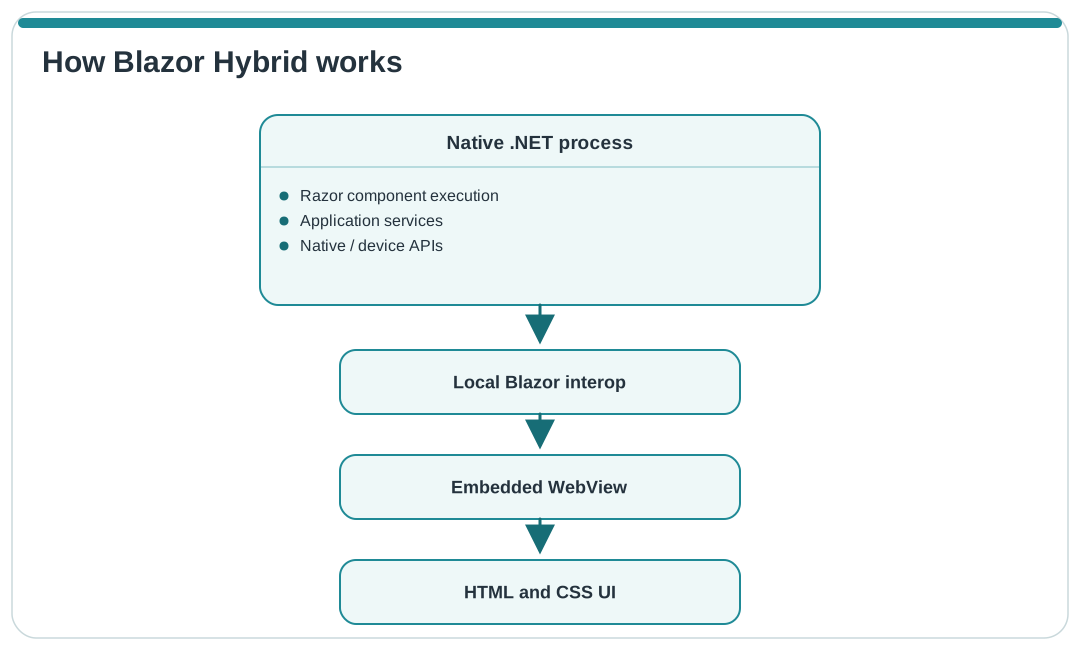
Razor components execute as normal .NET code inside the native process. Their rendered HTML is displayed through the embedded WebView.
JavaScript can still be used through JavaScript interop when browser APIs or existing JavaScript libraries are needed.
Consider BlazorWebView When
- You already have reusable Razor components
- Your team is experienced with Blazor
- You want to share UI components between web and native clients
- You want a C#/Razor component model while retaining access to native .NET APIs
- You are building line-of-business applications where web/native UI reuse has significant value
Not every web component will necessarily move unchanged. CSS assumptions, browser APIs, authentication models, host services, and WebView rendering differences should still be evaluated.
BlazorWebView Is Not Limited to MAUI
An important modernization option is that BlazorWebView is also supported in WPF and Windows Forms.
That means an existing WPF application does not have to migrate entirely to MAUI merely because the team wants to introduce reusable Razor UI.
For example, a large WPF application can retain:
- Its existing Windows shell
- Hardware integration
- WPF controls
- Deployment model
- Windows services
while selected screens or modules are gradually implemented using Razor components.
Those components may later also be reused in web or MAUI applications.
For many existing Windows applications, this incremental approach can be significantly less risky than a full WPF-to-MAUI rewrite.
HybridWebView in .NET MAUI
HybridWebView targets a different reuse scenario.
Where BlazorWebView is designed around Razor components, HybridWebView can host arbitrary:
- HTML
- CSS
- JavaScript
- Images
- Web frontend assets
It also supports bidirectional communication between JavaScript and C#/.NET.
This makes it particularly useful when the reusable UI asset is an existing frontend built with technologies such as:
- React
- Angular
- Vue
- Plain JavaScript/TypeScript
A common architecture is to build the web application into static frontend assets and package those files with the MAUI application.
For example:
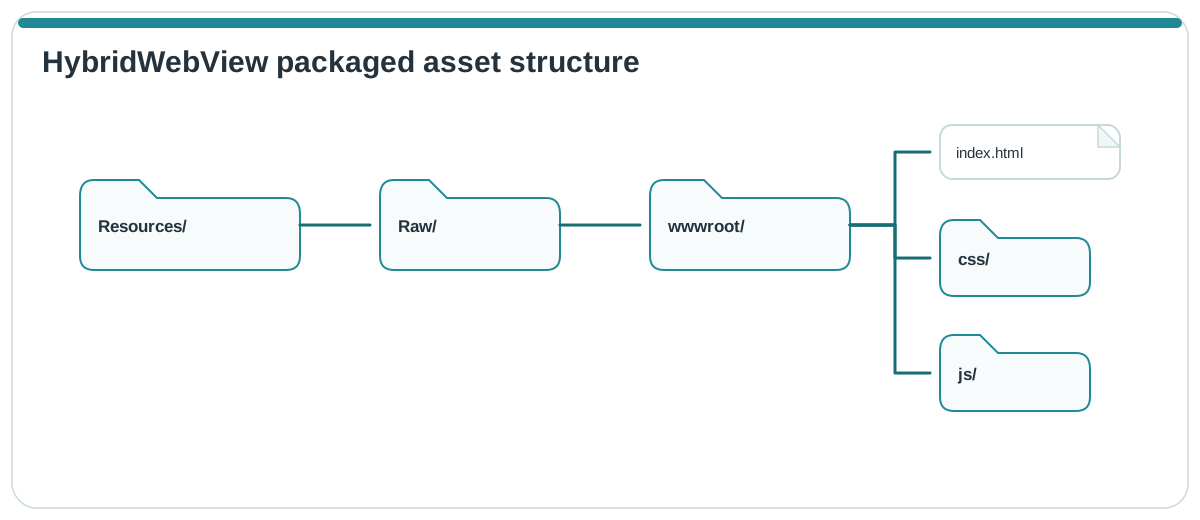
The application can then expose deliberately designed native capabilities through the JavaScript-to-.NET bridge.
Consider HybridWebView When
- You already have a substantial web frontend that you want to reuse
- Your team is more productive with React, Angular, Vue, or similar technologies
- The application needs native packaging while retaining a web-based UI layer
- JavaScript must communicate with native C# services
- Rebuilding the complete frontend in native MAUI XAML would not provide enough business value
Do Not Assume Native UI Performance
Although the host application runs natively and C# code executes in the .NET process, the HTML/CSS/JavaScript interface is still rendered through a platform WebView.
Depending on the operating system, that can involve WebView2, Android WebView, or WKWebView.
Therefore, a WebView-based UI should not automatically be described as having the same performance characteristics as native MAUI controls.
Profile:
- Startup time
- Memory consumption
- Scrolling
- Large lists
- Animations
- JavaScript workloads
- Web/native bridge calls
on representative target devices.
HybridWebView, Trimming, and Native AOT
A major .NET MAUI 10 limitation is that HybridWebView is disabled by default when full trimming or Native AOT is enabled.
This is important because HybridWebView relies on dynamic interop and serialization behavior that conflicts with aggressive trimming/AOT assumptions.
If both HybridWebView and Native AOT are being considered, make that decision early in the architecture process rather than treating Native AOT as a late performance switch.
Publish real Release builds early and test the artifacts that will actually be distributed.
Treat the JavaScript/.NET Bridge as a Security Boundary
A hybrid application gives web content access to capabilities that a normal website usually would not have.
The JavaScript-to-native bridge should therefore be treated as a security boundary.
Good practices include:
- Expose only narrowly scoped native operations
- Validate every value crossing the bridge
- Restrict unexpected navigation
- Validate the origin of web content where applicable
- Avoid generic "call any C# method" interfaces
- Do not grant remote or untrusted content unrestricted native privileges
- Disable bridge capabilities that are not required
- Avoid running WebView hosts with elevated privileges
The more powerful the native API exposed to JavaScript, the more important these controls become.
Choosing a Migration Strategy
For existing applications, the right question is often not simply "WPF or MAUI?"
The existing codebase can be more important than the theoretical capabilities of either framework.
Existing WPF Application, Windows Still Required
Prefer:
WPF on modern .NET 10
Modernize the runtime, dependencies, architecture, tests, and deployment pipeline without rebuilding the UI unnecessarily.
This normally preserves far more code than a move to MAUI.
Existing WPF Application With Razor UI Requirements
Consider:
WPF + BlazorWebView
This enables incremental modernization while retaining the existing Windows application host.
Existing WPF Application That Must Become Cross-Platform
Consider:
Shared .NET libraries + new MAUI presentation layer
Extract reusable parts such as:
- Domain models
- Business logic
- DTOs
- Validation
- API clients
- Protocol implementations
- Persistence abstractions
- Hardware/service abstractions
- Appropriate view-model logic
Then rebuild the platform/UI layers for MAUI.
Treat the UI migration as a redesign, not as automatic WPF-XAML conversion.
Existing Blazor/Razor Application
Consider:
.NET MAUI + BlazorWebView
This usually provides the most natural route when Razor components are the main reusable asset.
Existing React, Angular, or Vue Frontend
Consider:
.NET MAUI + HybridWebView
This may preserve substantially more frontend investment than rewriting the interface with MAUI XAML.
Support and Maintenance Matter as Much as Initial Development
Framework selection should include an operational maintenance plan.
Applications should remain on supported .NET and MAUI releases and current servicing versions.
This is especially important for self-contained deployments, where the runtime is bundled with the application. Such applications must be rebuilt and redeployed to receive runtime security fixes.
For MAUI applications, teams should separately track:
- .NET runtime support
- MAUI support
- Android SDK requirements
- Xcode requirements
- Apple platform changes
- Application-store requirements
The framework version chosen at project kickoff cannot simply be frozen for the lifetime of a long-running product.
Security and Dependency Licensing
WPF and .NET MAUI themselves use permissive MIT licensing, but applications often depend on many additional packages.
Third-party libraries for:
- UI controls
- Hardware
- Databases
- Reporting
- Charts
- WebView integration
- Native SDKs
may have different commercial or open-source licenses.
Review package licensing and Software Bill of Materials requirements as part of dependency selection rather than assuming all NuGet packages inherit .NET's licensing model.
The same principle applies to security and maintenance: avoid adopting a package only because it was widely used in older .NET Framework applications. Verify that it remains maintained and appropriate for modern .NET.
So, Should You Choose WPF or .NET MAUI?
Choose WPF when:
- Windows is the intended target platform
- You need a sophisticated desktop UX
- The application uses complex grids, docking, reporting, or desktop interaction models
- Deep Windows integration is important
- Local hardware/device integration is important
- You already have a substantial WPF codebase
- Mature XAML designer and third-party control ecosystems are valuable
Choose .NET MAUI when:
- Android and iOS are genuine product requirements
- Windows and Mac Catalyst clients should share substantial application code with mobile clients
- Native device and platform APIs are required across multiple operating systems
- Your organization can support platform-specific testing, signing, SDKs, and regular MAUI upgrades
- The benefits of shared cross-platform development outweigh the additional operational complexity
Choose BlazorWebView when:
- Razor components are the reusable UI asset
- The team already has significant Blazor expertise
- Web/native Razor-component reuse has business value
- You want to introduce modern Razor UI incrementally into WPF or MAUI
Choose HybridWebView when:
- HTML/JavaScript frontend code is the reusable asset
- You want to package an existing React, Angular, Vue, or similar frontend inside a native MAUI application
- The UI needs controlled access to native .NET capabilities
- The application's trimming/AOT requirements are compatible with the chosen hybrid architecture
Conclusion
For Windows-only desktop software, WPF remains a strong choice in 2026 rather than merely a legacy fallback.
Its mature desktop UI model, XAML capabilities, Windows integration, tooling, third-party controls, and established ecosystem continue to make it an excellent fit for many enterprise, industrial, engineering, and line-of-business applications.
Choose .NET MAUI when supporting Android, iOS, Mac Catalyst, and Windows from a shared application architecture is a real product requirement and the value of that shared approach justifies the additional platform-specific testing, release engineering, SDK management, and framework-upgrade work.
BlazorWebView and HybridWebView should not be treated as competing application frameworks alongside WPF and MAUI. They are UI-hosting strategies that can help reuse existing Razor or web assets.
In particular, existing WPF applications can use BlazorWebView incrementally, which can provide a practical modernization path without requiring an immediate move to MAUI.
The strategic decision is therefore Windows specialization versus multi-platform reach, not legacy versus future.
Before committing to a framework for a high-risk or long-lived project, build a vertical prototype containing representative UI, hardware or native integrations, deployment workflows, and performance-sensitive functionality. Measuring the real application workload is considerably more useful than choosing a framework based only on age, popularity, or theoretical feature lists.
Further Reading
- WPF documentation
- What's new in WPF for .NET 10
- Upgrade a WPF app to modern .NET
- .NET and .NET Core Support Policy
- .NET MAUI Support Policy
- What is .NET MAUI?
- .NET MAUI supported platforms
- What's new in .NET MAUI for .NET 10
- .NET MAUI compiled bindings
- .NET MAUI Native AOT
- .NET MAUI trimming
- ASP.NET Core Blazor Hybrid
- .NET MAUI BlazorWebView
- .NET MAUI HybridWebView
- WebView2 security guidance
Ready to launch a new desktop or cross-platform application?
Need to modernize a legacy WPF application?
Our expert developers can help you choose the right framework and deliver a solution perfectly aligned with your goals.
Contact Us Today!